Modbus TCP/RTU
The universal bridge linking modern AMRs to legacy industrial setups. Get seamless talks between fleet controllers, PLCs, and onboard gear with the most reliable standard out there.
Core Concepts
Client/Server Architecture
Formerly Master/Slave. In robotics, the AGV often plays Client (Master), sending requests to read sensors or command facility PLCs (Servers/Slaves).
RTU (Serial)
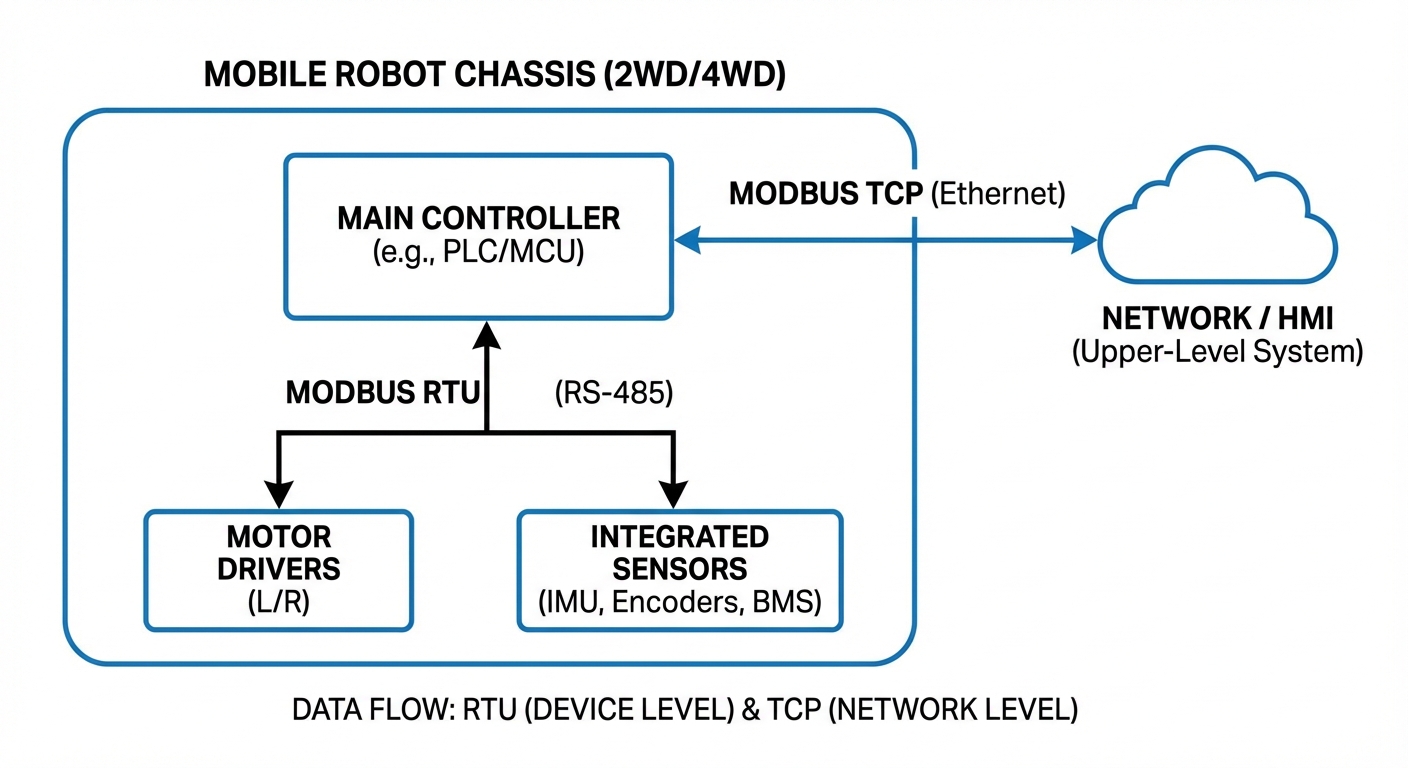
Modbus RTU runs over serial like RS-485. It's compact and binary—ideal for robot internals like battery management or lift motors.
TCP (Ethernet)
Modbus TCP wraps frames in TCP/IP packets, letting AGVs chat wirelessly with fleet managers, doors, or elevators.
Register Maps
Data lives in coils (bits) and registers (16-bit words). You'll need a precise register map to match robot status to PLC-understandable values.
Robustness
Not the fastest, but Modbus is rock-steady and noise-resistant—the go-to for safety handshakes in chaotic factories.
Gateway Translation
Modern AGVs use gateways to convert CAN or Modbus RTU into Modbus TCP, making it easy for warehouse systems to digest.
How It Works: The Handshake
In logistics, reliable communication is everything. Modbus acts as the trusty "handshake" between mobile robots and fixed infrastructure.
The AGV (Modbus TCP Client) rolls up to a conveyor. It writes a 'Single Register' command to the PLC (Server): "Ready to Unload." The PLC reads it, starts the belt, and sets its status to "Running."
This poll-and-response loop ensures machinery only fires when the robot's there and aligned—no spills, better safety, all without custom drivers.
Real-World Applications
Automatic Door Integration
AGVs trigger warehouse roll-up doors via Modbus TCP over WiFi. Flip an "Open" bit to the door controller's IP, clearing the path ahead and cutting down on sudden stops.
Internal BMS Monitoring
Inside the robot's chassis, Modbus RTU over RS-485 links the main computer straight to the Battery Management System. This lets the robot keep a close eye on voltage, current, and temperature, so it can smartly figure out when to recharge all by itself.
Conveyor Handshakes
The top industrial scenario: syncing your AGV's roller top with a fixed facility conveyor. Modbus registers swap 'Ready to Receive' and 'Transfer Complete' flags for spot-on timing every time.
Legacy Elevator Control
Lots of freight elevators miss out on modern APIs but have PLC controllers built in. Slap on a Modbus TCP gateway, and your AGVs can call the elevator and pick floors—no need for pricey infrastructure changes.
Frequently Asked Questions
What's the key difference between Modbus RTU and Modbus TCP in robotics?
It boils down to the physical connection layer. Modbus RTU runs on serial lines like RS-485, perfect for wired links inside the robot to sensors or motors. Modbus TCP uses Ethernet—standard cables or WiFi—to chat with external gear like fleet managers, elevators, and doors.
Is Modbus fast enough for real-time robot navigation?
Generally, no. Modbus is built for SCADA (supervisory control and data acquisition), with typical speeds from 10ms to 100ms. That's plenty for battery checks or docking signals, but zippy navigation loops need lower-latency champs like CANopen or EtherCAT.
How many devices can you daisy-chain on an AGV with Modbus RTU?
Modbus specs up to 247 unique addresses, but RS-485 physics usually limits you to 32 per segment without repeaters. On a mobile robot, keep the bus short and cap at under 10 devices to ensure rock-solid signals and snappy updates.
Does Modbus TCP support encryption for secure fleet communication?
Standard Modbus TCP is an open, plaintext protocol without native security or encryption. In real-world robotics, always tunnel it over a secure VPN or lock it in a dedicated VLAN to block unauthorized takeovers or fake commands.
What happens if WiFi drops mid-Modbus TCP operation?
Modbus TCP rides on TCP, so a WiFi dropout will timeout the socket eventually. Smart robot code needs 'watchdog' logic: if the heartbeat register stalls, switch to safe mode or halt right away.
Can I use Modbus to update the robot's firmware?
Sure, you could shove binary data into registers, but steer clear—it's a bad idea. Modbus isn't built for big file hauls. Go with FTP, SSH, or HTTPS-based OTA for reliable, speedy firmware updates.
Why choose Modbus over cutting-edge options like ROS 2 or DDS?
Modbus shines for tying into old-school hardware. ROS 2 nails internal robot smarts, but most warehouse conveyors, doors, and chargers run PLCs that only know Modbus or PROFINET. It's the perfect bridge from clever robots to basic infrastructure.
What are the go-to registers for AGV apps?
Apps lean on 'Holding Registers' (4xxxx) for reads and writes. You'll see stuff like Battery Level (0-100%), X/Y coords (scaled ints), State ID (Idle, Moving, Error), and Commands (Go to Charger, E-Stop).
How do you debug Modbus comms issues on a robot?
Start with the basics: wiring or IP reachability. For RTU, confirm baud rate, parity, and stop bits match perfectly. TCP? Check port 502. Tools like Modbus Poll or Wireshark are gold for sniffing packets and spotting error codes.
Does Modbus eat up much CPU on the robot's computer?
Nah, it's feather-light. Super low overhead means it runs fine even on tiny microcontrollers for side tasks, freeing the main CPU for nav and SLAM.
Can an AGV pull double duty as both Modbus Client and Server?
Yep. It can client-pull from BMS sensors while server-exposing its status—like position, battery, errors—to a fleet manager. This dual-role setup is everywhere in tricky integrations.
Do you need termination resistors for Modbus RTU on short robot cables?
Short bench tests might skip 'em, but in a mobile robot, 120 Ohm resistors at both RS-485 ends are a must. Motor noise causes reflections and dropouts without them.